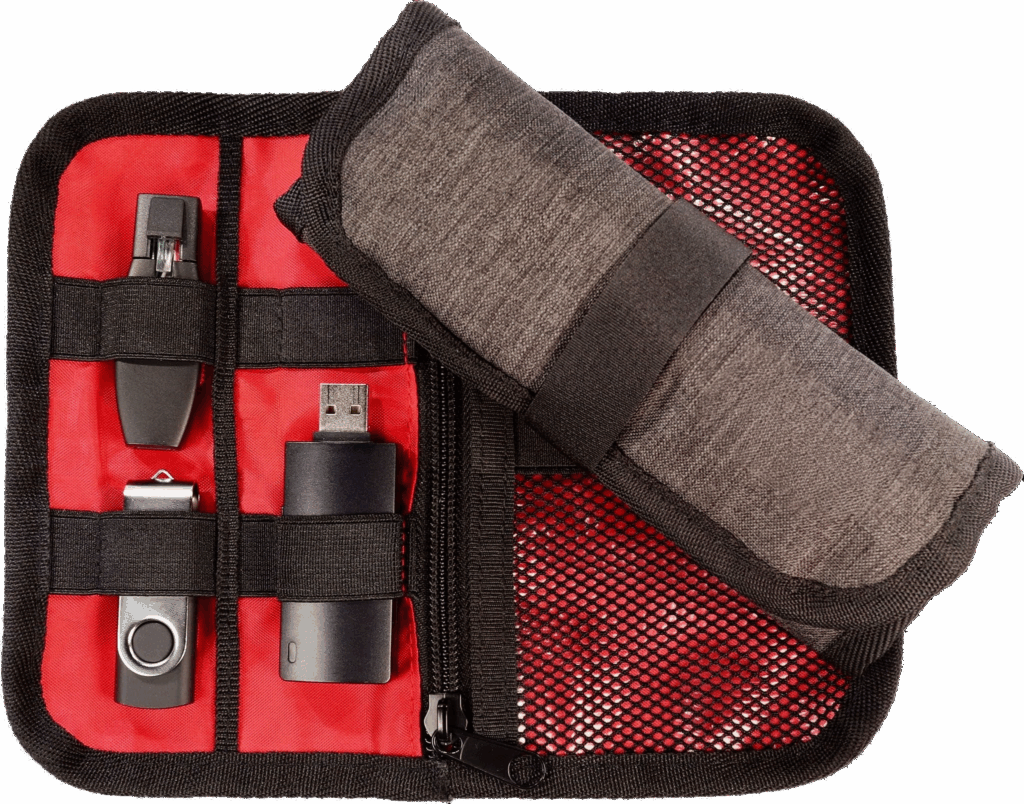
The Bash Bunny is a commercially sold USB attack platform that looks like an ordinary thumb drive but runs a full Debian userland and can impersonate several trusted USB device types at once. Introduced as the first multi-vector USB attack device, the Mark II adds Bluetooth Low Energy (BLE), wireless geofencing, remote triggering, and microSD expansion.
Plugged into a target machine, it can present itself as a keyboard (HID), a gigabit Ethernet adapter, a serial console, or mass storage, enabling keystroke injection, network hijacking, and data exfiltration in seconds with no user interaction. The Mark II’s radio is what moves it out of the purely physical threat model: the payload can wait for an RF signal, and the data it collects can leave over a channel the corporate network never sees.
Table of Contents
Quick Facts
- What it is: A pentest and red team USB attack platform from Hak5, roughly the size of a flash drive, running a full Linux userland on a quad-core CPU.
- What it emulates: HID keyboard, USB Ethernet/gigabit adapter, serial console, and mass storage, individually or in combination.
- Time to execution: Roughly seven seconds from insertion, with no click, file, or user action required.
- Platforms affected: Windows, macOS, Linux, and Android. This is not a Windows-only threat.
- Wireless capability (Mark II): Bluetooth Low Energy for remote triggering and geofenced payload conditions, plus microSD expansion and a serial root console.
- Why traditional controls miss it: Keystroke injection is trusted operating system input. There is no file on disk, no signature to match, and the emulated network adapter never touches the corporate segment your NAC watches.
- How to detect the wireless dimension: Continuous passive RF monitoring that identifies, classifies, and localizes BLE and other transmissions inside your facility.
What Is the Bash Bunny?
The Bash Bunny is a USB attack device that abuses the trust operating systems extend to peripherals. When any USB device is connected, it declares what it is through its USB descriptors, and the host takes that declaration at face value. A device that claims to be a keyboard is treated as a keyboard, including its ability to type commands at machine speed the moment it is recognized.
What separates the Bash Bunny from a simple keystroke injector is that it is a small computer, not a scripted cable. It boots a Debian-based system, selects among stored payloads with a physical three-position switch, reports status through an RGB LED, and can change what it claims to be partway through an operation. That makes it a multi-stage tool rather than a one-shot one.
In practice, security teams should treat it as a category rather than a single product. The Bash Bunny sits alongside the USB Rubber Ducky, the O.MG Cable, the USB Ninja Cable, the Flipper Zero, and a long tail of ESP32 and Arduino-based injectors. Controls that address only one of them leave the rest of the class untouched.
How Does It Work?
- Multi-Device Emulation: It can impersonate several USB device types at once or in sequence, enabling HID keystroke injection, network hijacking, and file exfiltration from a single insertion.
- Fast Boot and Payload Selection: With a quad-core CPU and desktop-class storage, the device is operational within roughly seven seconds. Payload selection happens on the device itself through a physical switch, with LED status feedback.
- Payload Configuration via Storage Access: In arming mode the device appears as an ordinary flash drive, so payloads, scripts, and captured data are managed by drag and drop.
- Network Hijacking: It presents itself as a high-priority Ethernet interface with its own DHCP service. Many operating systems will prefer that new interface over the existing connection, which yields traffic interception without compromising anything on the network side.
- Wireless Connectivity: The Mark II adds BLE, which supports remote payload triggering and geofencing conditions so an attack executes only when a specific beacon or phone is nearby.
- Expandability: microSD expansion increases exfiltration capacity, and a dedicated serial console provides direct root shell access to the implant.
The network hijacking behavior is the piece defenders most often underestimate. Because the rogue interface exists only between the implant and the host, network access control and 802.1X posture checks generally see nothing at all. Nothing new appeared on the corporate segment.
Bash Bunny vs. USB Rubber Ducky and Other USB Attack Devices
The most common question about the Bash Bunny is how it differs from the USB Rubber Ducky. The short answer: the Ducky is a single-purpose keystroke injector, while the Bash Bunny is a programmable platform that can also become a network adapter, a serial console, or storage, and can make decisions between stages.
| Device | Primary Vector | Wireless Capability | What Makes It Distinct |
| USB Rubber Ducky | HID keystroke injection | None | Fast, single-purpose, time-boxed drop |
| Bash Bunny Mark II | HID, Ethernet, serial, storage | BLE trigger and geofencing | Multi-stage logic and network pivoting |
| O.MG Cable | HID injection inside a normal-looking cable | Wi-Fi command and control | Indistinguishable from a real cable; remote payload editing |
| Flipper Zero | Multi-protocol RF, NFC, and HID | Sub-GHz, NFC, BLE | General-purpose wireless tool, widely available |
| ESP32 and WHID injectors | HID injection | Wi-Fi control interface | Cheap, homebrew, easily concealed |
The practical framing used by red teams: a Ducky for a fast drop where seconds of access are all that is available, a Bash Bunny where conditional payloads or a network pivot matter, and an O.MG-class cable where the implant needs to survive inspection and be operated remotely.
What the Mark II Changed
The Mark II is the version that pulls this device into the wireless conversation, and the capabilities that matter to defenders are the radio ones.
Remote triggering
The payload no longer has to fire on insertion. The implant can sit dormant and execute when an external signal arrives, decoupling the moment of placement from the moment of attack.
Wireless geofencing
Payload conditions can be tied to RF proximity, so the device only acts inside a specific environment. A device recovered and examined in a lab may simply never run.
Expanded capacity and access
microSD expansion raises how much data an implant can hold, and the dedicated serial console gives an operator direct root shell access to the device itself.
When USB Attacks Go Wireless
Keystroke injection used to be a physical-access problem with a clear beginning and end: someone plugged something in, something happened, they left. That model no longer holds. Three variants now recur across the device class:
- BLE-triggered payloads, where the implant waits for a specific beacon or phone to come within range before doing anything.
- Wi-Fi-equipped implants, including O.MG-class cables and ESP32-based injectors, which expose a control interface over the air for live payload changes and wireless exfiltration.
- Bluetooth HID attack platforms, which deliver keystroke injection by proximity rather than by insertion at all.
Each one breaks an assumption that most incident response programs still rely on:
- Placement and execution are separated in time. Dwell time between a device being left behind and its payload running can be arbitrary, so badge logs from the incident window will not necessarily contain the actor.
- Exfiltration never crosses the monitored network. Data leaves over the implant’s own radio, where DLP, egress filtering, and proxy logs have no visibility.
- Geofencing defeats lab analysis. A recovered device tested outside the target’s RF environment can look completely inert.
- The target is shared space, not the locked executive workstation. Conference rooms, lobby kiosks, reception desks, and hot-desk monitors are the realistic placement points.
Why It Matters
A common objection is that physical access means the game was already lost, so devices like this are demo props rather than distinct risks. That argument assumes a level of access most of these attacks do not require. What they need is momentary, unprivileged, unescorted proximity: a cleaning crew, a contractor, a temp, a pretext visitor, or an employee who already belongs in the building.
- Insider threat is the primary scenario. An insider does not need to socially engineer anyone. They already have the access that makes placement trivial.
- It has been done at scale. The FBI warned that FIN7 mailed malicious USB devices to targets disguised as health guidance and gift cards, which puts this firmly outside the theoretical.
- Regulated environments already treat RF as in scope. The Department of Defense requires continuous wireless device detection in SCIFs and SAPFs, making wireless monitoring a compliance obligation rather than a nice-to-have.
- OT and ICS raise the stakes. Safety Instrumented Systems that were historically isolated are now frequently connected for monitoring, which brings removable-media attack paths into environments where consequences are physical.
Can Antivirus or EDR Detect a Bash Bunny?
Traditional antivirus does not detect keystroke injection. There is no malicious file written to disk, no signature to match, and nothing anomalous about the process that receives the input, because the input arrives through the same trusted path as a real keyboard.
EDR is more capable but comes with three honest caveats worth stating plainly:
- Typing-speed and HID-anomaly detection is usually not enabled by default and requires deliberate tuning per environment.
- Detection is post-execution. A credential-theft payload can finish in under ten seconds, well inside the window between alert and analyst response.
- Timing-based detection is defeatable by inserting randomized delays between keystrokes, which is openly discussed in the offensive tooling community.
Work is underway to push this problem down the stack. A Linux HID driver proposed in 2026 scores keyboard-like devices on keystroke timing entropy, plug-and-type latency, and USB descriptor anomalies, then recommends userspace blocking, and academic keystroke-monitoring approaches take a similar line. None of it is deployed at scale yet, and none of it addresses the wireless trigger and exfiltration channels at all.
Detection Signals That Actually Work
No single signal catches this device class. These are the indicators that hold up in practice, drawn from device-control and incident response guidance:
| Signal | What It Catches |
| A second keyboard enumerating on a single-user workstation | Strong indicator of HID injection |
| Device class mismatch, such as a known storage VID/PID enumerating as HID | Firmware-reprogrammed BadUSB devices |
| First-time-seen USB device on a fully built-out endpoint | Any new implant; genuinely new peripherals are rare |
| Composite devices claiming multiple USB classes | Multi-vector devices specifically |
| Keystroke timing entropy and plug-and-type latency | Machine-rhythm input versus human typing |
| The same device fingerprint appearing across multiple endpoints | A device being walked around the building |
| Unexpected BLE or Wi-Fi emitters in fixed locations | The wireless trigger and exfiltration channel |
Note what happens after the fact. Payloads routinely include a cleanup stage that removes files and stops services, so the forensic residue is USB enumeration history rather than filesystem artifacts. That history only exists if USB event logging was turned on beforehand, which in most environments it is not.
Why Blocking USB Is Not Enough
“Can we just block USB?” is the most common control question, and the answer is a heavily qualified no.
- Blocking mass storage is easy and widely done. It stops file-based USB malware and does nothing whatsoever against HID injection.
- Blocking HID outright is where it breaks. Keyboards and mice are HID. Most default guidance allows HID because blocking it is unworkable, and that allowance is precisely the gap these devices occupy.
- Device-class blocking, VID/PID filtering, and serial-number allow-listing are the standard layered recommendation. Deploy them in monitor-only mode first, for at least a full business cycle, to inventory the peripherals people actually use.
Whether identifier-based allow-listing genuinely works is the sharpest technical disagreement in this space, and it deserves an honest answer rather than a vendor one. Kernel developers argue that blacklisting VID/PID is useless and whitelisting nearly so, because an attacker with physical access can read the identifiers of devices already attached and clone them. The defensible middle position is that identifier matching alone is weak, but VID/PID combined with full USB device and report descriptor validation before drivers bind is meaningfully stronger. The obstacle is that doing it correctly takes deep USB specification knowledge most teams do not have on staff.
Environments Endpoint Controls Cannot Reach
Every control above assumes an endpoint that can run an agent. Many of the systems most exposed to a walk-up USB attack cannot.
- Industrial control terminals and OT systems, where enterprise USB-control tooling built for IT endpoints frequently fails outright.
- Point-of-sale systems, kiosks, and medical devices, which have USB ports, sit in public or semi-public space, and rarely support EDR.
- Locked-down kiosk builds, which have been bypassed through obscure corners of the HID specification such as Consumer Control media keys, honored by most operating systems and disabled by almost no kiosk configurations.
In these environments the wireless layer is often the only place a wireless-triggered implant is observable at all, because there is no endpoint telemetry to work with.
Physical and Policy Controls
- Escorted visitor policy covering cleaning crews, contractors, and unscheduled vendor visits, which are the scenarios that come up repeatedly in real incidents.
- Screen-lock discipline, which substantially raises the bar but does not neutralize the network-emulation vector.
- Port blockers and epoxy on fixed-function terminals where no one legitimately needs a USB port.
- Charge-only adapters for public or borrowed charging.
- USB event logging enabled in advance, so that an investigation has enumeration history to work from.
Awareness training belongs on the list, with a caveat. Red teams report that USB drop tests still succeed at high rates inside organizations with mature awareness programs, and training does nothing at all against an implant placed by someone with legitimate access. Treat it as one layer, not as the control.
How Bastille Detects Wireless-Triggered USB Implants
Unlike a USB Rubber Ducky, the Bash Bunny Mark II emits Bluetooth Low Energy, and the beacon or phone that triggers it emits as well. That radio activity is a detection opportunity that endpoint tooling cannot see. Bastille performs 100% passive monitoring of the RF spectrum from 100 MHz to 7.125 GHz using a network of software-defined radios, observing transmissions directly rather than inferring them from network traffic.
Detect the trigger
Identify BLE beacons and transmissions used to activate or control implants, including devices that never join Wi-Fi or enroll in an MDM.
Localize the device
Pinpoint where a transmitting device sits inside a facility so security teams can physically recover it instead of knowing only that something is there.
Alert by zone
Define RF geofences and alert the moment an unexpected emitter appears in a conference room, SCIF, executive area, or data center floor.
It is worth being clear about scope. RF monitoring does not stop a USB device from enumerating, and it does not replace endpoint device control. What it covers is the layer nothing else watches: the trigger signal, the wireless control channel, and the exfiltration path that never touches your network. Endpoint controls handle the wired vector, RF monitoring handles the wireless one, and neither is complete on its own. For the broader wireless detection picture, see wireless intrusion detection systems and rogue wireless access point detection.
Common Misconceptions
- “It is a USB stick, so blocking removable storage stops it.” Storage policy leaves the HID path completely untouched.
- “Antivirus will flag it.” No file is written and no signature exists to match.
- “It only works on Windows.” Cross-platform operation on Windows, macOS, Linux, and Android is a headline capability.
- “Someone has to open a file or click something.” No user interaction is required beyond the device being connected.
- “It is a physical-only threat.” Mark II BLE triggering and Wi-Fi-equipped implants in the same class break that assumption.
- “A locked screen makes me safe.” It raises the bar considerably but does not eliminate the network-emulation vector.
- “Nobody actually uses these.” FIN7 mailed them to targets.
Frequently Asked Questions
What is a Bash Bunny and how does it work?
The Bash Bunny is a USB attack platform made by Hak5 that runs a full Linux system inside a device the size of a flash drive. When connected, it declares itself to the host as a trusted peripheral such as a keyboard, Ethernet adapter, serial console, or storage device, and the operating system accepts that declaration. From there it can inject keystrokes, hijack network traffic, or exfiltrate data, typically within about seven seconds of insertion.
What is the difference between a Bash Bunny and a USB Rubber Ducky?
The USB Rubber Ducky is a single-purpose keystroke injector: it enumerates as a keyboard, types its payload at machine speed, and stops. The Bash Bunny runs a full operating system and can emulate multiple USB classes in sequence or simultaneously, including a network adapter, which allows multi-stage attacks and network pivoting. The Mark II also adds Bluetooth Low Energy, which the Ducky does not have.
Can antivirus or EDR detect a Bash Bunny?
Traditional antivirus generally cannot, because keystroke injection produces no file and no signature. Some EDR products can alert on superhuman typing speed or unexpected HID enumeration, but that detection is usually off by default, fires after execution, and can be evaded with randomized keystroke delays. Treat EDR as a partial control rather than a solution.
How do I detect keystroke injection attacks?
The most reliable indicators are a second keyboard enumerating on a single-user workstation, a device class mismatch between a known VID/PID and the class it claims, composite devices claiming multiple classes, and keystroke timing that lacks human entropy. USB event logging must be enabled in advance for any of this to be visible during an investigation.
Does blocking USB storage stop BadUSB attacks?
No. Blocking mass storage stops file-based USB malware but has no effect on HID injection, because the attack arrives through the keyboard class rather than the storage class. Effective policy has to address device classes and descriptors, not just removable storage.
Is USB device whitelisting by VID/PID effective?
Only partially, and this is genuinely contested. An attacker with physical access can read the identifiers of devices already connected and clone them, which undermines identifier matching on its own. Pairing VID/PID matching with full USB device and report descriptor validation before drivers bind is meaningfully stronger, though it requires USB specification expertise most teams lack.
What is HID spoofing?
HID spoofing is when a device falsely declares itself as a Human Interface Device, typically a keyboard, so the operating system grants it the trust a keyboard receives. Because operating systems accept USB descriptors at face value, a device with any physical form factor, including a cable or charger, can present as a keyboard and type commands.
Can a Bash Bunny attack a locked computer?
A locked screen blocks keystroke injection into a user session, so it substantially reduces what an implant can accomplish. It does not neutralize the device entirely, because the emulated network adapter can still be enumerated by the host and used to intercept traffic without any user being logged in.
Does the Bash Bunny work on macOS and Linux?
Yes. Cross-platform support across Windows, macOS, Linux, and Android is one of its headline capabilities, and the network-hijacking behavior in particular is effective across all of them because the underlying trust in USB peripherals is the same.
What does the Mark II’s Bluetooth capability change about the threat?
It separates placement from execution. An implant can be left in place and triggered later by a BLE signal, or configured with a geofence so it only runs inside a specific environment. That defeats badge-log correlation around the incident window and can make a recovered device appear inert when tested in a lab.
How do I detect a wireless-triggered USB implant?
Through continuous passive RF monitoring that classifies and localizes transmissions inside the facility. Endpoint tools cannot see a trigger signal or a wireless exfiltration channel, so detection has to happen at the radio layer, with zone-based alerting for areas where an unexpected emitter should never appear.
Can these devices exfiltrate data without using my network?
Yes. Wireless-capable implants can carry data out over their own radio, so DLP, egress filtering, and proxy logs never observe the transfer. Storage-based exfiltration to onboard microSD is also invisible to network monitoring until the device is physically retrieved.
How do I protect OT and ICS terminals that cannot run an endpoint agent?
Combine physical controls such as port blockers, escorted access, and strict removable-media procedures with wireless monitoring that does not depend on host agents. Because RF monitoring observes the environment rather than the endpoint, it covers control terminals, kiosks, point-of-sale systems, and medical devices that cannot be instrumented directly.
Are USB drop attacks still effective against trained employees?
Yes. Red teams consistently report high success rates for USB drop tests even in organizations with mature awareness programs. Training also provides no protection at all when the device is placed by an insider or a visitor with legitimate physical access.
Is a wireless intrusion detection system necessary, or is endpoint device control enough?
Endpoint device control is necessary and not sufficient. It addresses the wired vector on managed hosts, but it cannot see BLE triggers, wireless control channels, or off-network exfiltration, and it cannot be deployed on OT, kiosk, or medical systems at all. A wireless intrusion detection system covers those gaps; the two controls are complements rather than alternatives.
Closing the Blind Spot
The Bash Bunny represents an evolved USB attack platform built on multi-vector emulation, near-instant execution, and remote staging. Endpoint device control, USB event logging, and physical policy all reduce exposure on the wired side. What none of them see is the radio: the trigger that starts the payload, the control channel that operates it, and the exfiltration path that bypasses the network entirely.
Bastille’s passive RF monitoring detects, classifies, and localizes the wireless activity these devices depend on, giving security teams the ability to find an implant rather than only learn that one was used. See a demo to understand how it works in your environment.